Log the day in a minute.
Find out what it costs you.
Journaler is a daily journal you fill in like a notebook: sleep, work, training, meals, how you felt and anything else you choose to track, one page a day. Then it does the part nobody does by hand. It compares every measure against every condition in your own history and tells you, in plain sentences, which differences are real and which are noise.
$20 a month or $180 a year, with 30 days free. Cancel any time, and take everything with you.
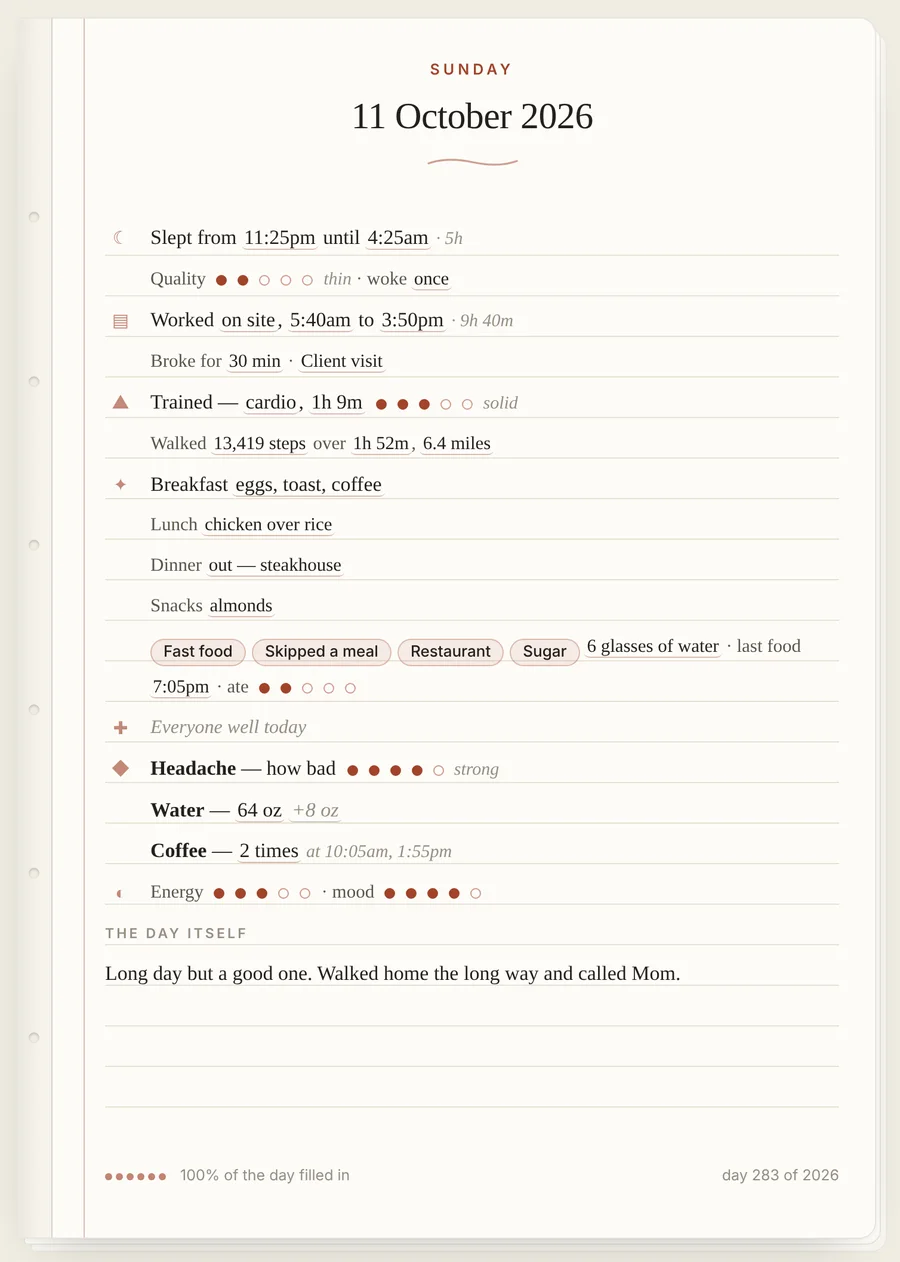
What goes on the page
Nothing is required. A day with only a bedtime still counts, and the analysis tells you how many days each finding rests on rather than pretending the gaps are not there.
☾Sleep
Bed and wake times with the duration worked out for you, quality, night wake-ups and naps. Bedtimes past midnight are handled properly rather than averaging to nonsense.
▤Work
Day type, start and finish, breaks and where you worked. Hours are worked out for you, night shifts included, and days off are recorded as days off rather than zero-hour days.
▲Training and walking
Trained or rested, what kind, how long and how hard, plus steps, walking time and distance. A rest day is a fact, not a blank.
✦Meals
Breakfast, lunch, dinner and snacks in your own words, with quick tags and water. Separate dishes with commas and it learns what you actually eat.
✚Health at home
Who was unwell, with symptoms and how bad, for anyone in the household, plus missed school days. Consecutive sick days become one episode.
◆Anything else you track
Headaches, water, coffee, medication, a habit you are building. Pick how it is measured and it gets its own line on every page and its own trend.
More than a log
The page is the heart of it. Around it sit the tools that make a daily record worth keeping.
Plan ahead, then see what happened
Jot notes on future days, set repeating plans, and when the day comes, tick off what got done. Week and month calendars keep today easy to find.
Talk to your journal
Type or say "slept badly, gym for 40 minutes, pasta for dinner" and it fills in the page. Ask how your sleep has been this month and get a straight answer.
Save it as a PDF New
Print any day, or a whole month at once, as neat notebook pages, one day per sheet. Choose Save as PDF and keep your journal on your own computer.
Your to-do list, on the page
Use urIssue for tasks? Switch it on and each day shows what you finished, what you started and what is still open. Off by default.
Phone, tablet and computer
Log on your phone during the day and read the analysis on a big screen at night. It keeps working with no signal and catches up when you are back.
Export any time
A full JSON backup that restores into Journaler, or a CSV with one row per day that opens straight in Excel. One click, no limits, no charge.
The part that is actually hard
Anyone can keep a log. Most get abandoned because reading back six months of entries tells you nothing. Journaler runs the comparisons for you and only reports what clears both a size and a significance bar.
- Condition comparisons. Every measure against every condition it can build from your data: training days, long days, office and home days, days with a drink, days someone is unwell, each meal tag, each weekday.
- Next-day carryover. Whether today's short night shows up in tomorrow's training, tomorrow's appetite, tomorrow's mood.
- Correlations, lagged and same-day. With the mechanically obvious pairs filtered out, so you are not told that wake time correlates with work start.
- Day-of-week profiles. Which weekday is quietly the worst one, shown as the gap from your own average rather than a misleading truncated axis.
- Illness episodes. Grouped per person, with who tends to catch things after whom, and what your sleep and activity looked like in the week before each one.
- Honest statistics. Real p-values, minimum sample sizes, and the sentence "this could easily be chance" when that is the truth.
Sleep on days over 10 hours of work
5h 53m on days over ten hours of work against 7h 18m on shorter days, 85 minutes less.
The day after nights under 6 hours
Training the next day runs 8 minutes on average after a short night, against 26 after a full one.
Night wake-ups in the week before illness
Across the seven days before each one, wake-ups averaged 0.8 against your usual 0.4.
What it will not do
It will not tell you what caused what. Everything here is a pattern in how your days happen to line up, and the app says so on every card that reports one. It will not invent a finding to look busy either: when nothing in a range clears the bar, the page says that plainly, because "no signal" is a real answer. And it is not medical advice. A lead about the week before you get ill is somewhere to look, not a diagnosis.
Your data
Entries are stored against your account and synced across your devices. Nothing is sold, shared or used to train anything. Export the lot as JSON, CSV or printed PDF pages any time, including on the way out, and if you cancel, your entries stay put and come back when you return.
Pricing
One plan. Journaler comes with an Apex+ membership, which also opens the other Apex Labs apps on the same account. You manage or cancel it from your Apex+ account.
Everything in the app, on every device, with unlimited history and full export. Already have an Apex account? Sign in with the email and password you already use.
Get Journaler with Apex+Already a member? Sign in
Apex+ includes
- JournalerThis daily journal, planner and analysis.
- urIssueTasks with their own running history, which can show up on your journal pages.
- FraywireMarket research: charts, screeners and portfolio ledgers.
- Glideslope AIMarket news with sentiment scoring and an analyst chat.
- CivilXLConstruction project management.
Questions
How long before it tells me anything?
About two weeks of entries before the Insights page says anything at all, and it gets noticeably sharper at three months. That is not a limitation of the app; it is how many days a comparison needs before the difference between two groups means more than the difference between two coin flips.
Do I have to fill in every field?
No. Log what you care about and leave the rest. Each finding reports the number of days behind it, so a field you only fill in sometimes simply produces weaker findings rather than wrong ones.
Can I print my journal or keep a copy on my computer?
Yes. Print any single day from its page, or pick a range of up to a month on the Data tab. Each day comes out as its own notebook page, and Save as PDF in the print window puts it on your computer. JSON and CSV exports are there too.
Can I track the family's sick days too?
Yes. Add each person once, and the app groups their sick days into episodes, works out who tends to come down with something after whom, and keeps missed school days alongside.
I already have an Apex account from another app.
Then you already have a login. The same email and password work here, and an Apex+ membership covers Journaler.
Does it work offline?
Yes. The app keeps working with no connection and queues what you write, then sends it to the server the moment you are back.
Start keeping the record
A minute a day now, an honest answer about your own patterns in three months.
Get Journaler with Apex+